Duo MFA requires at least one "device" to be set up before you can use Duo Bypass Codes
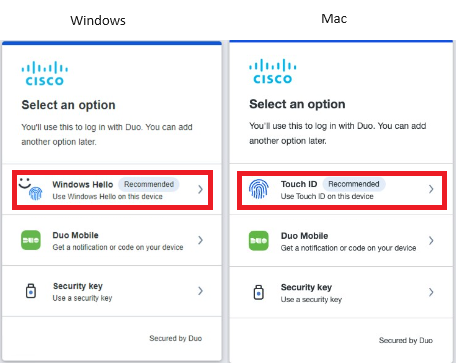
You can use Mac Touch ID or Windows Hello on your non-Cisco computer to enroll into Duo. Once you are enrolled, please contact someone from the acquisition support team to get a Duo Bypass code
Bypass codes are only good for about 4 hours, so you will need to set up Duo with either Mac Touch ID or Windows Hello on your new Cisco laptop once it is configured
You should also obtain and configure a YubiKey or update your mobile device to run Duo Mobile push. There are some Cisco resources that cannot use Hello or Touch ID
- Click
Windows Hello orTouch ID and follow the onscreen instructions - If you haven't set up Windows Hello,
click here, then
click the back button to return to these instructions - If you haven't set up Mac Touch ID,
click here, then
click the back button to return to these instructions - Linux Users: If you are not able to use Duo Mobile, then you will need to configure a YubiKey (aka Security Key)
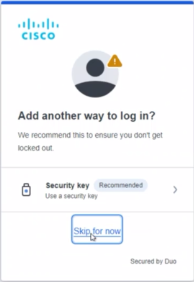
- On the "Add another way to log in?" screen, click
Skip for now