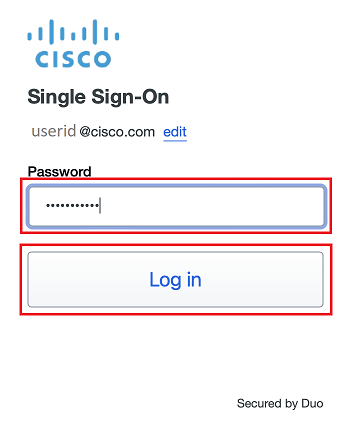
- Enter your Cisco password click Log in
- A Duo Verified Push code will pop up on your Cisco device
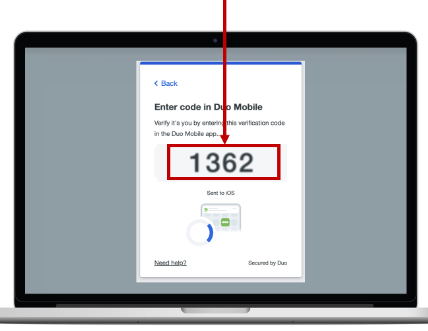
- Verify it is you logging into your Duo app. Did you initiate this push?
- Note: you might have to scroll down to see the verification code prompt
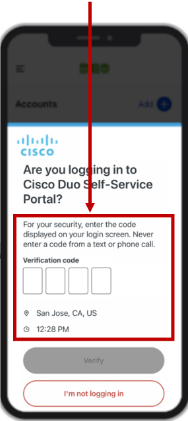
- Enter the verification code when prompted
- Only use the code provided within the Duo login prompt from your Cisco device
- NEVER enter a code provided by a third-party, including:
- The Cisco help desk
- Text message (SMS)
- A phone call or email

 Cisco Bridge Page
It is important to verify that you are able to log into the Cisco Bridge page. You will access this page during your Cisco Onboarding Journey Kickoff session.
- Open https://bridge.cisco.com
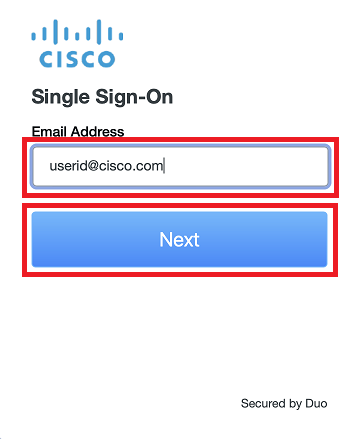
- If prompted, enter your Cisco e-mail address and new password into the SSO login fields, then follow the Duo prompts
- Note: If you are already signed into the Cisco Bridge page, then simply scroll to the end of this page and click Next Step: Druva inSync
- If you receive an error message, sign into this page: https://id.cisco.com, then go back to Step 1 to confirm you can sign into the Cisco Bridge site